
When patients look for chiropractic care today, they rarely open a phone book or ask a friend first. Instead, they search online, and in most cases, they turn to Google Maps. For chiropractors, Google Maps is the single most important local marketing tool for generating new patients from Google.
Google Maps does more than help patients find your clinic. It allows them to call your office, get directions, or visit your website directly from the search results, often within seconds of searching. This direct access makes Google Maps one of the most effective channels for converting online searches into booked appointments.
This article explains why Google Maps drives the majority of calls that lead to new patients from Google, how to optimize your listing correctly, and which steps help your chiropractic practice rank higher in the local map pack.
Why Google Maps Is the #1 Driver of New Patient Calls

Google Maps connects patients to local businesses based on proximity, relevance, and credibility. For chiropractors, this is where the majority of new patients discover nearby clinics.
Studies show that:
- More than 80 percent of local healthcare searches result in a call or visit within 24 hours.
- Listings in the top three map pack positions receive the majority of clicks and phone calls.
- Patients trust Google Maps ratings and reviews as much as personal recommendations.
If your clinic is not appearing in the top map results, potential patients are likely calling your competitors instead.
How Google Maps Rankings Work
Google determines local map rankings based on three main factors:
- Relevance – How well your profile matches what a person is searching for.
- Distance – How close your clinic is to the searcher’s location.
- Prominence – How well-known and trusted your practice appears based on reviews, photos, and content.
You can influence all three with consistent optimization.
Step-by-Step Guide to Optimizing Your Google Maps Listing
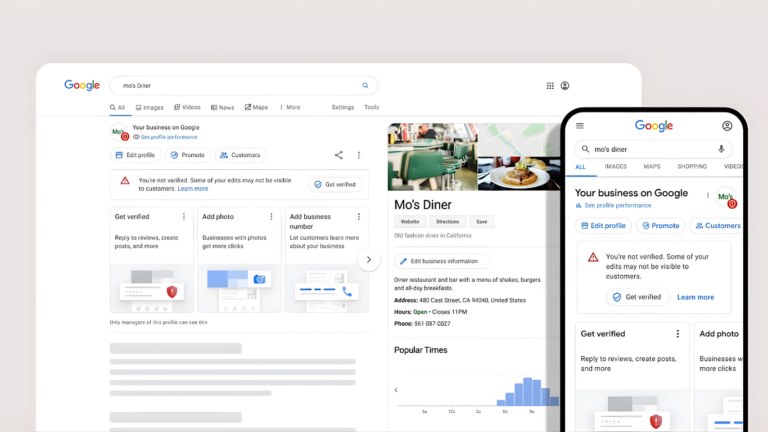
Follow these actionable steps to strengthen your visibility and attract new patients directly from search results.
Step 1: Claim and Verify Your Google Business Profile
If you have not already done so, visit Google Business Profile Manager and claim your listing. Verification ensures that your information can appear in Maps and Search.
Checklist:
- Enter your correct practice name, address, and phone number (NAP).
- Add your website URL and business hours.
Verify ownership via postcard or phone.
Step 2: Choose Accurate Business Categories
Selecting the right primary and secondary categories helps Google match your clinic with relevant searches.
Recommended categories for chiropractors:
- Primary: Chiropractor
- Secondary: Sports Chiropractor, Wellness Center, Pain Management Physician (if applicable)
Avoid unrelated categories to maintain relevance.
Step 3: Add High-Quality Photos and Videos
Google prioritizes profiles with active visual content. Add professional images of your office, treatment rooms, staff, and exterior signage.
Best practices:
- Upload at least 10–15 photos, updated quarterly.
- Include a short video introducing your clinic or showing treatments.
Use descriptive filenames, such as “chiropractic-adjustment-office-[city].jpg.

Step 4: Collect and Respond to Patient Reviews
Reviews are one of the strongest ranking and conversion signals in local SEO for chiropractors.
Tips for managing reviews:
- Ask every satisfied patient to leave a review using a direct link.
- Respond to all reviews courteously and professionally.
- Address concerns promptly to demonstrate care and credibility.
Step 5: Use Google Posts for Engagement
Google Posts allow you to share updates directly in your profile. They appear in your listing and can drive website visits or appointment requests.
Types of posts to share:
- Weekly health tips or posture advice
- Seasonal promotions or new patient specials
- Community event participation
Keep posts short, visual, and relevant. Each one stays visible for seven days, so posting weekly keeps your listing active.
Step 6: Ensure NAP Consistency Across the Web
Your practice’s name, address, and phone number must match exactly across every platform. Inconsistencies confuse Google and hurt your rankings.
Audit directories like:
- Yelp
- Healthgrades
- Facebook
- Local Chamber of Commerce listings
Update all incorrect or outdated entries.
Step 7: Optimize for Keywords in Your Profile
Include target keywords such as “chiropractors Google Maps”, “local SEO for chiropractors”, and your city name in:
- The business description field
- Service names and details
- Photo captions and posts
Avoid keyword stuffing. Keep language natural and patient-focused.
Tips to Boost Rankings in the Map Pack
To climb higher in the local 3-pack, implement these additional strategies:
- Post regularly to signal activity and relevance.
- Earn backlinks from local websites or directories.
- Add service area details if you serve multiple neighborhoods.
- Engage with Q&A by answering patient questions directly on your listing.
- Monitor insights to track clicks, calls, and search queries.
Small updates made consistently produce significant ranking gains over time.
Common Mistakes to Avoid
- Using an incorrect business category or multiple duplicate listings
- Ignoring review requests or negative feedback
- Uploading low-quality or irrelevant photos
- Forgetting to update holiday or seasonal hours
- Using inconsistent addresses across directories
Correcting these issues can improve visibility within weeks.

Chiropractors Google Maps FAQs
How long does it take to rank higher on Google Maps?
Most clinics begin seeing measurable improvements within 30 to 90 days of consistent optimization.
Should I run ads on Google Maps?
Yes, Google Local Service Ads can complement organic listings by placing your practice at the very top of the map results for relevant searches.
Can multiple clinic locations share one Google profile?
No. Each physical location should have its own verified Google Business Profile with unique contact details.

Conclusion
For chiropractors, Google Maps is not just a digital directory; it is a patient acquisition engine. When optimized correctly, your listing becomes a continuous source of calls, website visits, and new appointments.
Investing in Google Maps and local SEO ensures that your practice stays visible, trusted, and chosen by patients searching nearby.
If you want expert help optimizing your Google Maps presence, contact Revolution Web Studios today for a complete local SEO strategy built specifically for chiropractors.